How to Convert a PDF to JPG Images
Save PDF pages as JPG images in your browser. Choose the pages, the DPI and the quality, then download one JPG or all of them in a ZIP file.
3 min read
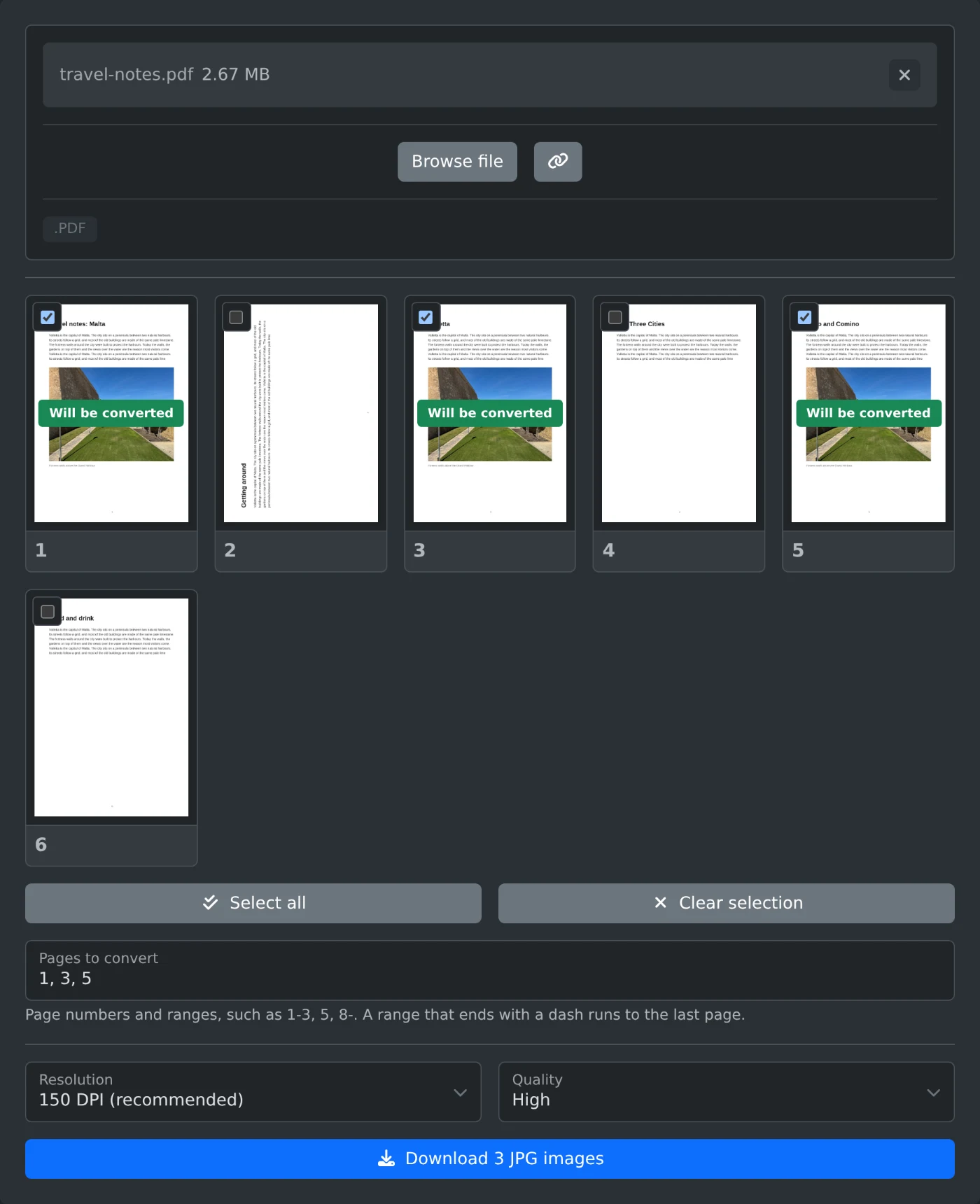
To convert a PDF to JPG, open the PDF to JPG converter and upload the PDF. Every page appears as a thumbnail, and all pages are selected. Pick a resolution and click the Download button. One page is saved as a JPG file, and several pages come in one ZIP file. All the work happens in your browser, and the PDF is never uploaded.
Nothing is converted until you click Download. Until then, you can change the pages and the settings as often as you like.
How to save the pages as JPG files
- Drag the PDF into the upload area, or click "Browse file" and pick it.
- Wait for the thumbnails. Each selected page shows "Will be converted".
- Untick the pages you do not need. Click a thumbnail to open a larger view of that page.
- Choose a Resolution and a Quality.
- Click the Download button. It names the number of images, for example "Download 3 JPG images". For one page, it says "Download JPG".
- Wait while the message "Converting page 1 of 3" counts up. The download starts after the last page.
How to type the page numbers
Enter the pages in "Pages to convert", such as 1-3, 5. Use commas between pages and a dash for a range. A range that ends with a dash runs to the last page, so 8- means page 8 to the end. The ticks on the thumbnails change as you type.
A page number that is not in the file turns the field red, and Download stays off until you fix it. "Clear selection" unticks every page. "Select all" ticks them all again.
Which resolution to choose
The resolution sets the pixel size of each image. This is what an A4 page gives:
| Resolution | Image size |
|---|---|
| 72 DPI (screen) | 595 x 842 pixels |
| 150 DPI (recommended) | 1240 x 1754 pixels |
| 300 DPI (print) | 2480 x 3508 pixels |
150 DPI is the default and fits most uses. Pick 300 DPI when you want to print the images. Each JPG stores the DPI you picked.
Quality is High by default. Medium and Low make smaller files with less detail.
What the download contains
A single page is saved as travel-notes-page-3.jpg when the PDF is called travel-notes.pdf. Several pages come as travel-notes-jpg.zip, with one JPG per page inside. In a PDF with 10 pages or more, the ZIP adds zeros in front of short page numbers, such as report-page-03.jpg. The images then sort in page order.
Text pages, posters and protected PDFs
- Pages that are mostly small text look sharper as PNG images. Use the PDF to PNG converter for them.
- Areas of a page with no background come out white.
- Very large pages, such as posters, are made smaller than the chosen DPI so the browser can draw them.
- A PDF with a password shows an error. Remove the password with the PDF password remover first, then upload the new file.
For most files, keep 150 DPI and High quality, tick the pages you need, and click Download.
Ready to try it yourself?
PDF to JPG Converter
Convert PDF pages to JPG images. Pick the pages, the resolution and the quality, then download one image or all of them in a ZIP file. Runs in your browser.