How to Convert JPG to PDF
Turn JPG photos into one PDF in your browser. Put them in order, pick the page size and a margin, and download the PDF. Nothing is uploaded.
3 min read
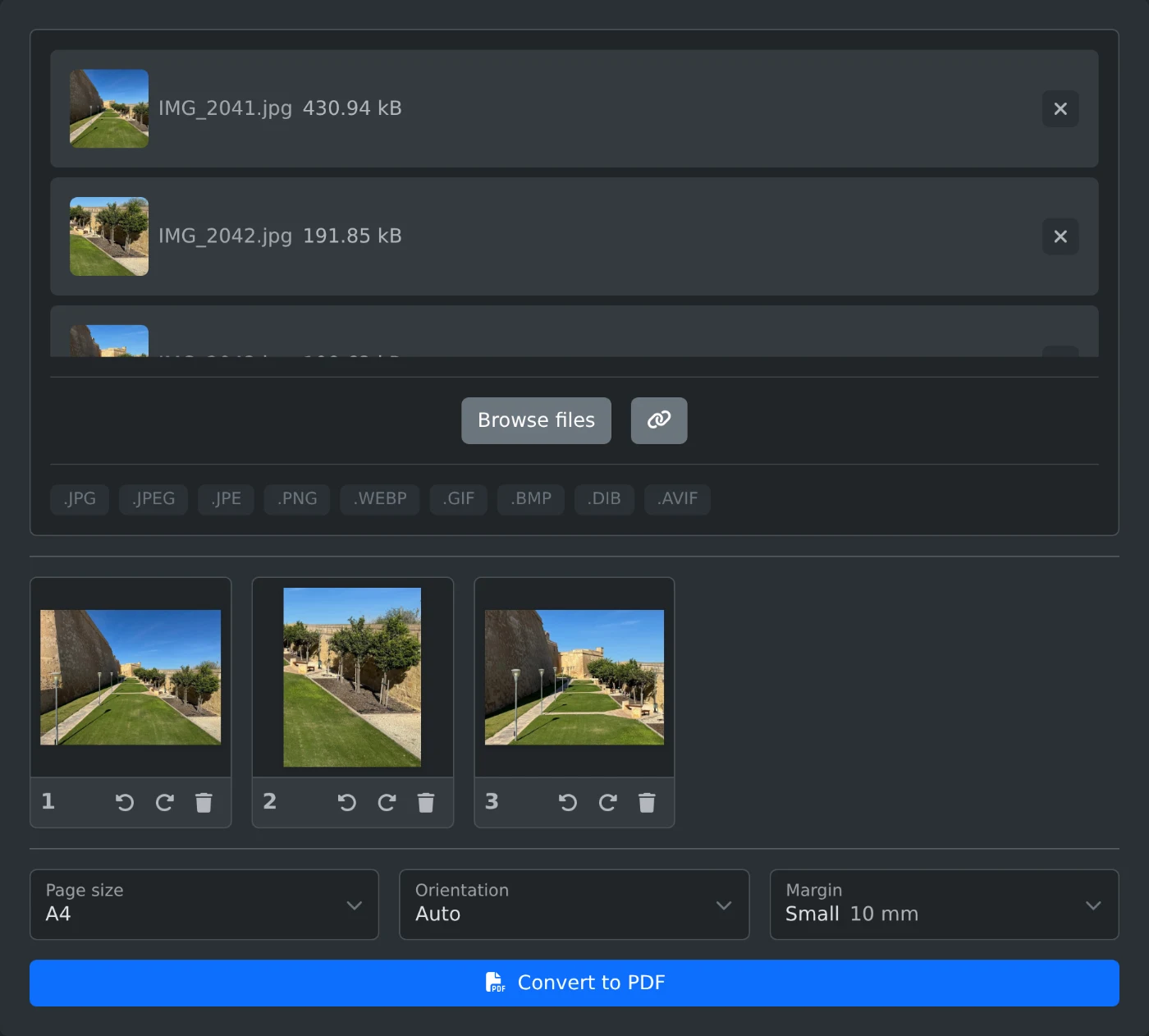
To convert JPG to PDF, open the Image to PDF converter and add your photos. Drag them into the order you want, pick a page size, and click "Convert to PDF". Each image becomes one page of a single PDF. The images are put together in your browser and are never uploaded.
PNG, WebP, GIF, BMP and AVIF images work too, and you can mix formats in one PDF.
How to turn photos into a PDF
- Drop the images onto the upload box, or click "Browse files". You can pick several at once.
- Wait for the thumbnails. Click a thumbnail to see the image at full size.
- Drag the thumbnails into the order you want. Image 1 becomes page 1.
- Pick a "Page size" and a "Margin".
- Click "Convert to PDF". The PDF downloads when it is ready. It is named after the first image, so
IMG_2041.jpggivesIMG_2041.pdf.
Which page size to pick
"Same as image" is the default. Each page is the size of its photo, with nothing around it.
Pick "A4" or "US Letter" when the PDF will be printed. Each photo is scaled to fit the page and centered on it. "Orientation" works only with these two sizes. "Auto" gives a landscape photo a landscape page and a portrait photo a portrait page. "Portrait" and "Landscape" use one orientation for every page.
"Margin" adds an empty border around each photo. "Small" is 10 mm and "Large" is 25 mm. The default is "None".
How to fix a sideways photo
Phone photos come out the right way up. If a thumbnail still shows a photo sideways or upside down, click "Rotate left" or "Rotate right" under it. Each click turns it by a quarter turn. The page in the PDF turns with it.
Before you convert
- New images go to the end of the list. Drag them to their place.
- To take an image out, click "Remove image" (the trash button) under it.
- JPG photos go into the PDF as they are, so they keep their full quality. The PDF is about as large as all the photos together. For a smaller file, run it through the PDF compressor.
- HEIC and TIFF files are skipped with a message. Turn HEIC photos into JPG first with the HEIC to JPG converter.
Check the order of the thumbnails once more, then click "Convert to PDF".
Ready to try it yourself?
Image to PDF Converter
Turn JPG, PNG, WebP and other images into one PDF. Drag them into order, rotate them, pick the page size and margins, then download the PDF. Runs in your browser.