How to Add Page Numbers to a PDF
Number the pages of a PDF in your browser. Pick the position and a format such as Page 1 of 12, leave out the cover if you want, and download.
3 min read
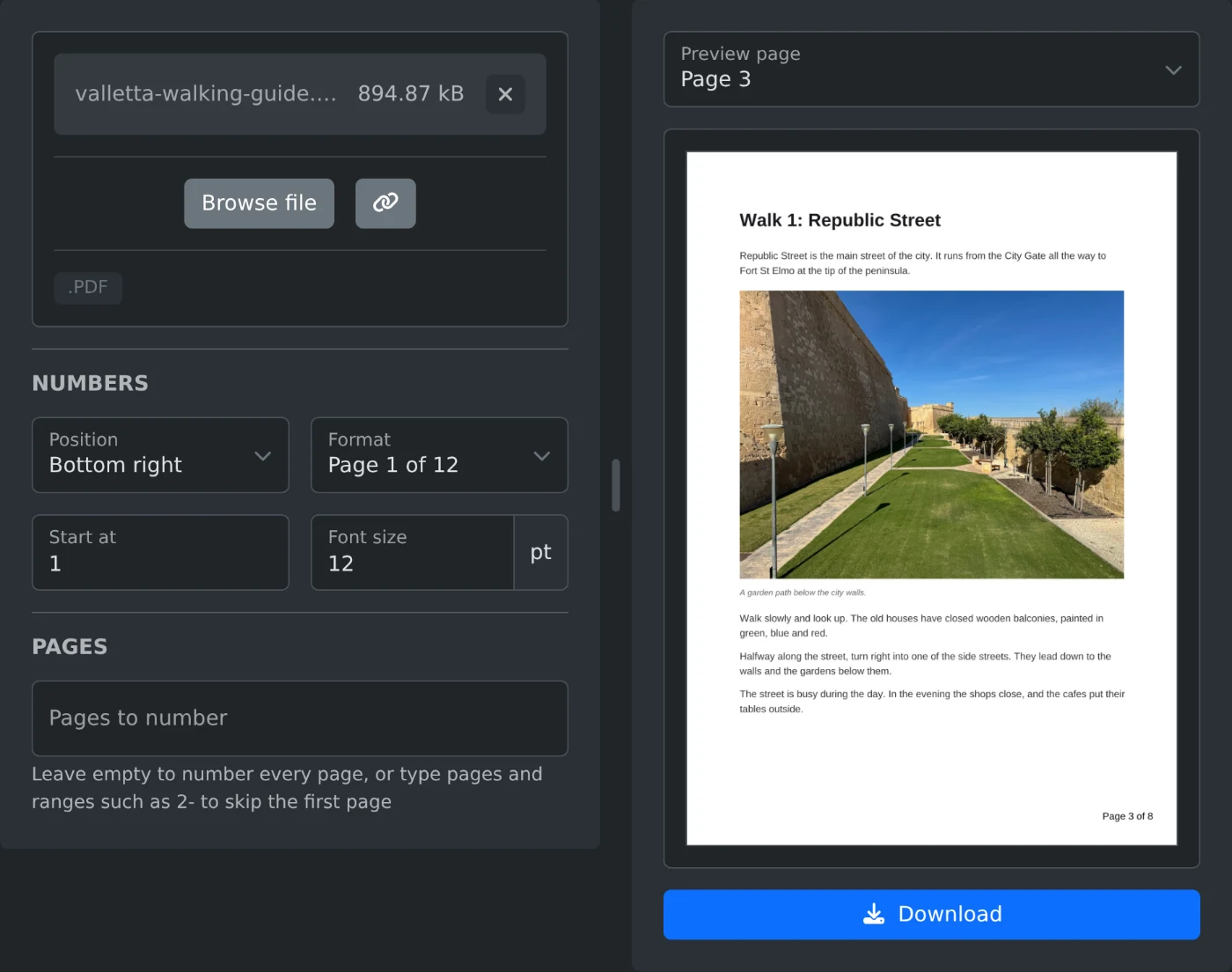
To add page numbers to a PDF, open the PDF page numbers adder and upload the file. Pick a position and a format, check the preview, and click Download. By default every page gets a number, starting at 1. The file is read in your browser and is never uploaded.
How to number the pages
- Drop the PDF onto the upload box, or click "Browse file".
- Pick where the numbers go in "Position". The default is "Bottom center".
- Pick how they read in "Format":
1,1 / 12,Page 1orPage 1 of 12. - Check the preview. It updates when you change a setting. Pick another page in "Preview page" to see its number.
- Click Download. The file is saved with
-numberedadded to its name.
How to leave the cover page without a number
Type 2- into "Pages to number". The cover gets no number, and the count starts on page 2, so page 2 shows 1. To make each number match its page in the file, also set "Start at" to 2. Page 2 then shows 2, page 3 shows 3, and so on.
The field also takes single pages and ranges, such as 1-3, 5. Pages you leave out are not counted, so page 5 then shows 4. Leave the field empty to number every page.
What the total in "1 / 12" shows
The total is the last number on the pages, not the page count of the file. In an eight page file with 2- typed in, the numbers run from 1 / 7 to 7 / 7. With "Start at" set to 2, they run from 2 / 8 to 8 / 8.
"Start at" takes whole numbers from 0 to 99999. Use it when a file continues another one, such as the second part of a report that starts on page 41. Pick the 1 or Page 1 format then. With a total, ten pages starting at 41 would show 41 / 50 to 50 / 50.
Where the numbers sit on the page
The numbers are black and sit about 0.4 inch from the edges of the page. They are drawn on top of what is already there. If they cover a footer or an old page number, pick another position, such as "Top right". On a page that is turned sideways, the number still sits upright at the edge you see.
The default size is 11 pt. "Font size" takes 4 to 72 pt.
Before you download
- "Pages to number" takes only pages that exist in the file. For any other page, the hint under it shows the valid range, and Download stays off.
- A PDF with a password or restrictions cannot be numbered. Remove them first with the PDF password remover.
- The original file on your computer is not changed. You get a new file.
Pick the position, look at two or three pages in the preview, and download.
Ready to try it yourself?
PDF Page Numbers Adder
Add page numbers to a PDF. Pick the position, a format such as 1 / 12 or Page 1 of 12, the first number, the size and the pages to number, check the preview and download.