How to Add a Watermark to a PDF
Stamp DRAFT, CONFIDENTIAL or your own text on the pages of a PDF in your browser, check the preview, and download the watermarked file.
3 min read
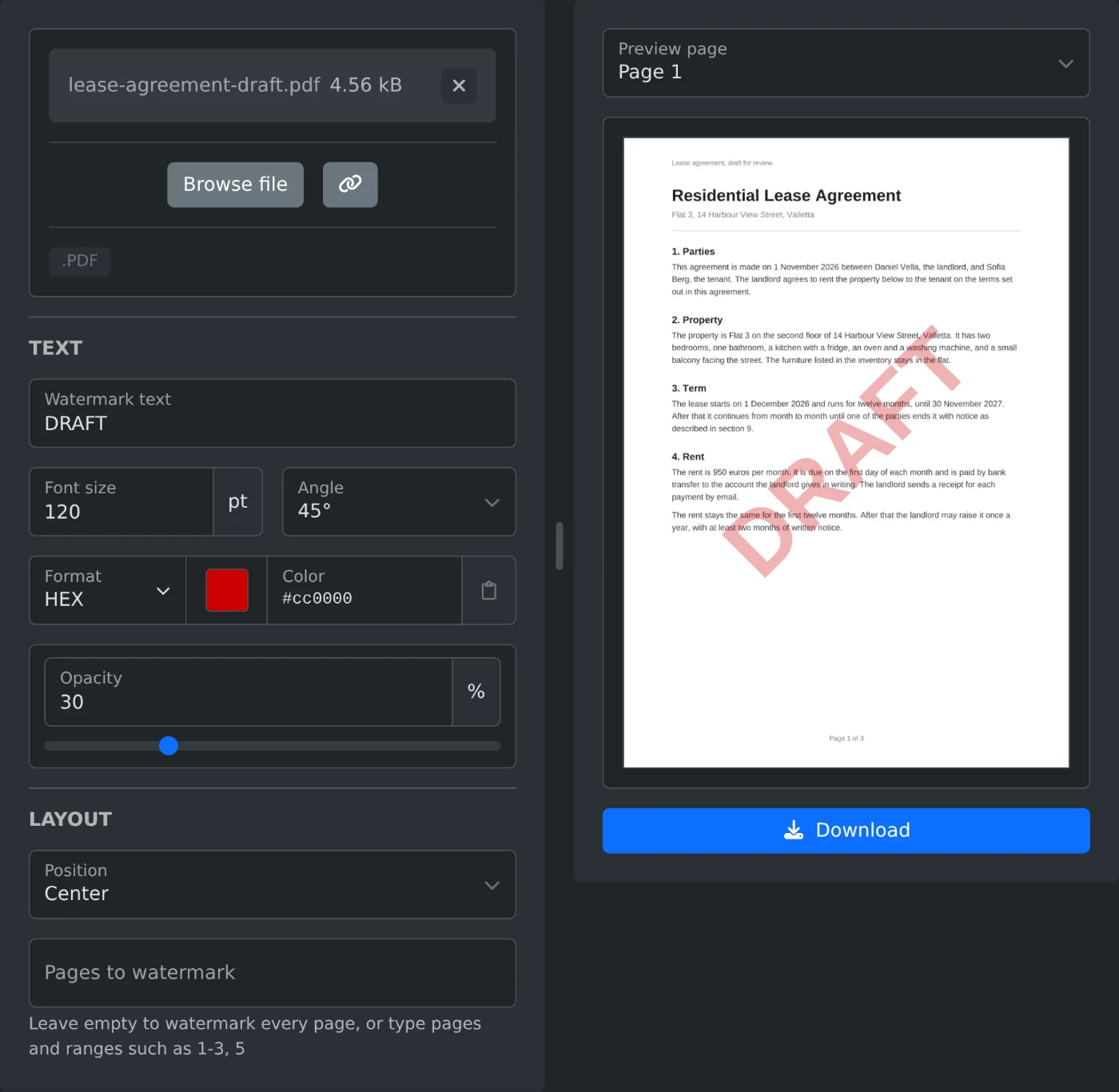
To add a watermark to a PDF, open the PDF watermark adder and upload the file. Type the text, such as DRAFT or CONFIDENTIAL, into "Watermark text". The preview shows the page with the watermark. Click Download to save a copy with the watermark on every page. The PDF is read and saved in your browser and is never uploaded.
How to watermark the PDF
- Drop the PDF onto the upload box, or click "Browse file".
- Type the text into "Watermark text".
- Change the size, angle, color or opacity if you want.
- Under "Position", pick "Center" or "Tiled across the page".
- Check the preview. Pick another page under "Preview page" to see it too.
- Click Download. The file is saved with
-watermarkedadded to its name.
The preview updates after each change. Click it to see the page at full size. Download turns on once "Watermark text" has some text in it.
Which settings to use
| Setting | Starts at | Choices |
|---|---|---|
| Font size | 60 pt | 6 to 300 pt |
| Angle | 45° | 45°, 0°, 90°, -45° |
| Color | Gray | Any color |
| Opacity | 30% | 5% to 100% |
| Position | Center | Center, Tiled across the page |
At 45° the text rises from left to right. At -45° it goes down from left to right. A short word such as DRAFT looks small at 60 pt. At 120 pt it spans more than half the width of an A4 page.
The watermark is drawn on top of the page content. At 30% opacity the text under it stays easy to read. A higher opacity makes the mark stronger but hides more of the text under it. A font size outside 6 to 300 pt marks the field as invalid, and Download stays off until you fix it.
How to cover the whole page
Pick "Tiled across the page" under "Position". The text then repeats in even rows over the whole page, at the angle you chose. A smaller font size puts more copies on the page, and a larger one puts fewer.
How to watermark only some pages
Leave "Pages to watermark" empty to mark every page. To mark only some, type page numbers and ranges, such as 1-3, 5. A range without an end runs to the last page, so 2- skips only the first page. For a three page file, typing 7 shows "Use page numbers from 1 to 3, such as 1-3, 5" under the field.
Pages you leave out appear in the preview without the watermark. Pick one under "Preview page" to check it.
Before you download
- Latin, Greek and Cyrillic text is added as real text in a bold font.
- Other scripts, such as Arabic, Chinese or Japanese, and emoji are added as an image of the text.
- Rotated pages get the watermark upright, the way a PDF viewer shows them.
- A PDF with a password or restrictions shows an error. Remove them first with the PDF password remover.
- The original file on your computer is not changed. You get a new file.
Type the text, check the preview on two or three pages, and download.
Ready to try it yourself?
PDF Watermark Adder
Add a text watermark such as CONFIDENTIAL or DRAFT to the pages of a PDF. Set the size, color, opacity and angle, place it in the center or tile it across the page, then download.