A New Look for the Browser Extension
The Chrome and Firefox extension now looks like the site and speaks 16 languages
2 min read
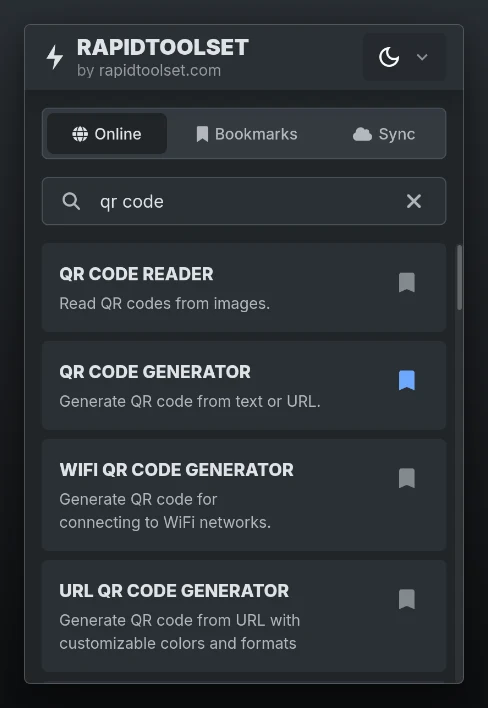
The popup now matches the site
The RapidToolSet extension for Chrome and Firefox has a new design. Its popup used to have a style of its own. It now uses the same styles as the site, so it looks like a small piece of it.
What you'll notice:
- Tool names in bold capitals, like the tool cards on the site
- Results on the same tinted cards, with a blue bookmark on saved tools
- A header with the logo and a link to rapidtoolset.com
- The site's Light, Dark and System theme menu
The Online, Bookmarks and Sync tabs work the same as before.
Now in 16 languages
The popup used to be in English and Russian only. It now follows your browser's language, in any of the site's 16 languages: English, French, German, Italian, Norwegian, Russian, Spanish, Portuguese, Swedish, Finnish, Polish, Arabic, Dutch, Turkish, Greek and Japanese.
Search results and synced bookmarks show tool names and descriptions in that language, and a click opens the tool page in it. Arabic switches the popup to a right to left layout. Any other browser language gets English.
The popup has no language menu. To change its language, change the language of your browser.
Your bookmarks stay
The update leaves your data alone. Bookmarks saved in the extension and a linked account are still there after it.
Get the extension
- Chrome, Edge and Brave: Chrome Web Store
- Firefox: Firefox Add-ons
The extension is open source. The code is on GitHub.