How to Check if a Domain Name Is Available
Find out if a domain name is free to register or already taken. For a taken name, see the registrar, the date it was created and the date it expires.
2 min read
Featured tool
Controle van domeinbeschikbaarheid
Controleer of een domeinnaam beschikbaar is voor registratie of al in gebruik is. Er wordt een live WHOIS-zoekopdracht uitgevoerd. Als het domein geregistreerd is, worden de registrar en de aanmaak- en vervaldetails weergegeven.
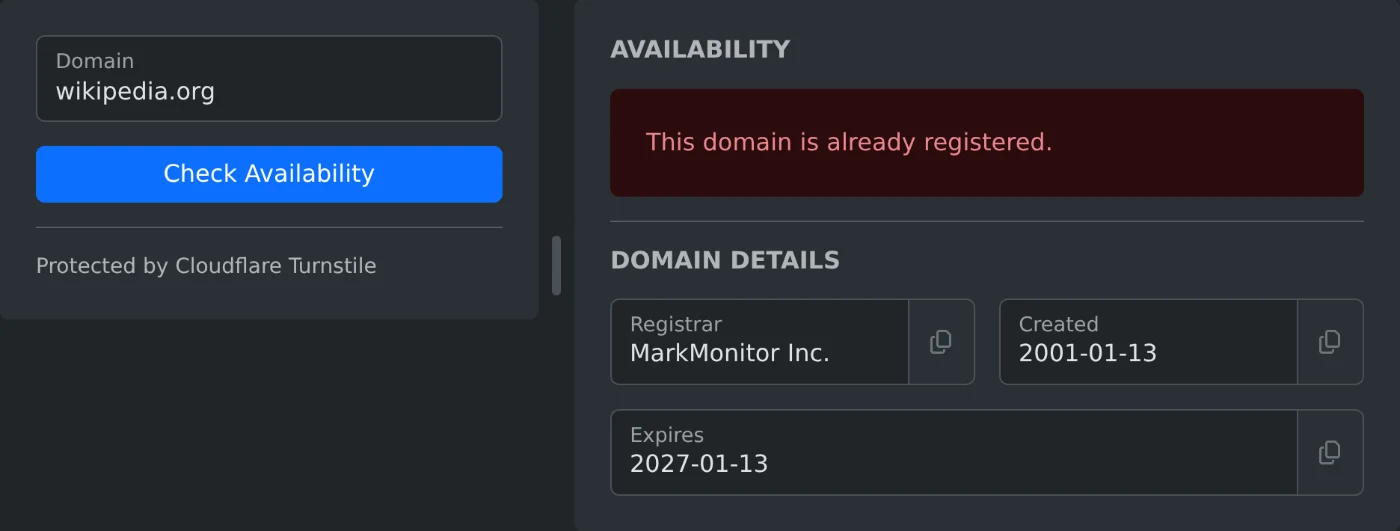
To check if a domain name is available, open the Domain Availability Checker and type the name with its ending, such as wikipedia.org. Click "Check Availability". A green message means the name appears to be free to register. A red message means it is already registered, and Domain Details shows the registrar and the dates.
A domain can be taken even when no website opens at that address. The check reads the registration record of the domain, so it also finds names that have no site.
How to type the domain name
- Type the name with its ending:
wikipedia.org, notwikipedia. - Leave out
https://,www.and any path after the name. - Capital letters make no difference.
A name without an ending shows the message "Field "domain" has an invalid value". A name with www. in front, such as www.wikipedia.org, gets no clear answer. Type wikipedia.org instead.
What the three results mean
| Message | What it means |
|---|---|
| This domain appears to be available for registration. | No registration was found. You can try to register the name. |
| This domain is already registered. | Someone has registered the name. Domain Details shows the registrar and the dates. |
| Could not determine availability for this domain. Try a WHOIS lookup instead. | The lookup gave no clear answer. Check the name with the WHOIS Lookup. |
What to do when the name is taken
For a registered name, Domain Details shows three fields. Registrar is the company that handles the registration. Created and Expires are dates in year, month, day order. Each field has a copy button.
To find a free name, try small changes and check each one:
- The same name with another ending, such as
.comor.net. - The name with a short extra word.
- The name with a dash between the words.
Before you register the name
The check shows no price. You see the price at the registrar where you buy the domain. The result is also from the moment of the check, so check the name again if you wait a few days before you buy it.
Type the name, read the message, and try other endings until you find a free one.
Ready to try it yourself?
Controle van domeinbeschikbaarheid
Controleer of een domeinnaam beschikbaar is voor registratie of al in gebruik is. Er wordt een live WHOIS-zoekopdracht uitgevoerd. Als het domein geregistreerd is, worden de registrar en de aanmaak- en vervaldetails weergegeven.