Comment générer une palette de couleurs avec l’IA
Décrivez une ambiance en quelques mots, comme des couleurs chaleureuses et douillettes d’automne, et obtenez une palette assortie en quelques secondes.
3 min de lecture
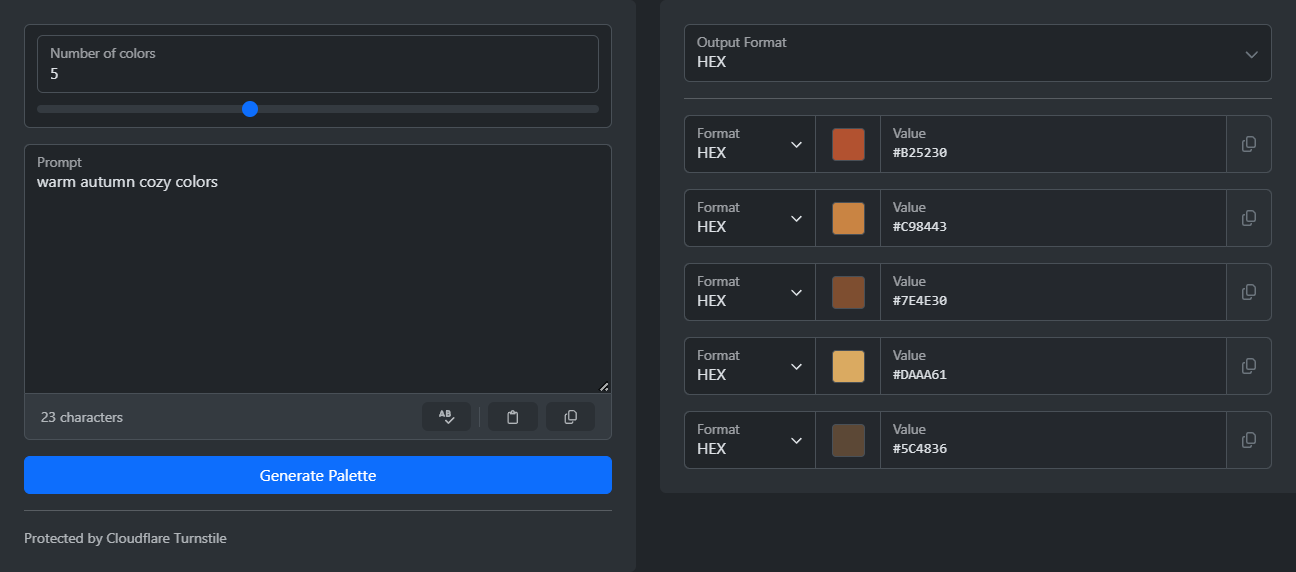
Pour générer une palette de couleurs, ouvrez le générateur de palettes de couleurs par IA. Décrivez l’ambiance que vous recherchez, puis cliquez sur « Générer la palette ». Vous obtenez un ensemble de couleurs harmonieuses. Un bouton de copie se trouve à côté de chaque couleur. Vous pouvez choisir le format des valeurs : HEX, RGB, HSL ou HSV.
Choisir des couleurs à la main est difficile. Une couleur ne s’accorde souvent pas avec les autres, et on ne sait pas vraiment comment y remédier. Il est beaucoup plus simple de décrire l’ambiance avec des mots. L’IA transforme votre description en couleurs.
Comment générer une palette
- Saisissez une courte description dans le champ Prompt, par exemple « couleurs chaleureuses et douillettes d’automne ».
- Réglez le nombre de couleurs avec le curseur. Vous pouvez en choisir de 1 à 25.
- Effectuez la courte vérification.
- Cliquez sur « Générer la palette ».
- Choisissez le format de sortie et copiez chaque couleur à l’aide de son bouton de copie.
Comment rédiger un bon prompt
Le prompt est le seul champ à remplir : quelques mots supplémentaires peuvent donc faire toute la différence. « Printemps » peut évoquer n’importe quoi. « Jardin printanier aux tons pastel doux » donne déjà une ambiance, un sujet et une idée de l’intensité des couleurs.
- Ajoutez une ambiance, pas seulement un sujet : calme, énergique, luxueuse, ludique.
- Ajoutez un style ou une époque : art déco, minimalisme scandinave, années 80 rétro.
- Précisez l’utilisation prévue des couleurs. « Interface d’application de bien-être » et « couverture de livre pour enfants » donnent des palettes très différentes.
- Combinez deux idées pour obtenir un résultat moins courant, comme « un paradis tropical rencontre l’élégance des entreprises ».
Si le résultat est presque bon, mais qu’une couleur ne convient pas, modifiez légèrement le prompt et générez une nouvelle palette. C’est plus rapide que de corriger une couleur à la main, et la nouvelle palette restera harmonieuse.
Combien de couleurs choisir
La plupart des projets nécessitent moins de couleurs que vous ne le pensez :
- Trois pour un site web simple : une couleur d’arrière-plan, une couleur de texte et une couleur d’accent.
- Cinq pour une application ou une marque : vous aurez ainsi une deuxième couleur d’accent et une couleur neutre.
- Plus de cinq pour des illustrations, des graphiques ou si vous souhaitez avoir un large choix.
Comment utiliser la palette
Copiez chaque couleur dans le format utilisé par votre projet. Les sites web utilisent généralement HEX ou RGB. HSL est pratique dans les outils de design dotés de curseurs de teinte et de luminosité : il suffit de modifier une valeur pour obtenir une version plus claire ou plus foncée. HSV est disponible pour les outils qui l’utilisent.
Enregistrez le prompt avec les couleurs. Si quelqu’un vous demande plus tard « la même chose, mais en plus chaleureux », vous pourrez repartir du même prompt.
Envie de l'essayer vous-même ?
Générateur de palette de couleurs IA
Générez des palettes de couleurs harmonieuses à l'aide de l'IA. Décrivez l'ambiance, le thème ou le style souhaité, et laissez l'intelligence artificielle créer un schéma de couleurs cohérent avec des noms et des descriptions pour chaque couleur.