AIでカラーパレットを生成する方法
「温かみのある秋らしい、居心地のよい色」のように、雰囲気を言葉で伝えるだけで、ぴったりのカラーパレットを数秒で作れます。
3分で読めます
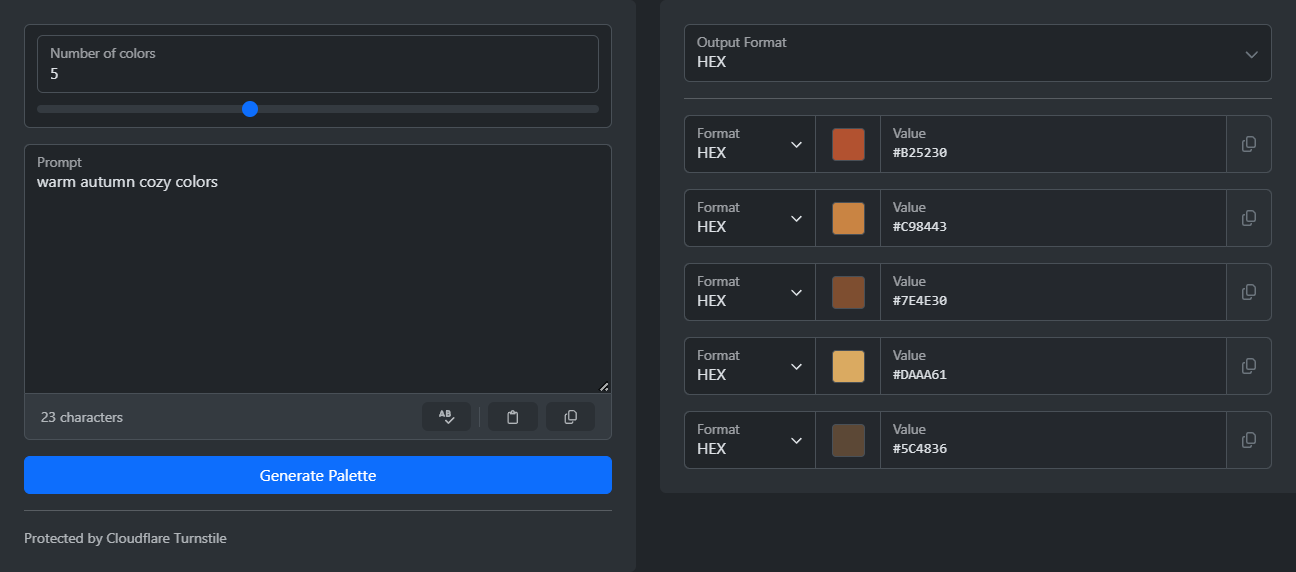
カラーパレットを生成するには、AIカラーパレットジェネレーターを開きます。希望する雰囲気を入力して、「パレットを生成」をクリックします。組み合わせに統一感のある色が表示されます。各色の横にコピー用ボタンがあり、値の形式はHEX、RGB、HSL、HSVから選べます。
手作業で色を選ぶのは大変です。ある色がほかの色と合わないことも多く、どう直せばよいか分からないこともあります。雰囲気を言葉で表現するほうがずっと簡単です。AIが入力した説明を色に変換します。
パレットの生成方法
- プロンプト欄に「温かみのある秋らしい、居心地のよい色」など、短い説明を入力します。
- スライダーで色の数を設定します。1〜25色を選べます。
- 簡単な認証チェックを完了します。
- 「パレットを生成」をクリックします。
- 出力形式を選び、各色のコピー用ボタンで色をコピーします。
よいプロンプトを書く方法
プロンプトだけが入力項目なので、少し言葉を足すだけで結果がぐっとよくなります。「春」だけでは、どんなイメージにもなりえます。「淡いパステルカラーの春の庭」なら、雰囲気やテーマ、色の強さまで伝わります。
- テーマだけでなく、雰囲気も加えます。例:穏やか、エネルギッシュ、高級感のある、遊び心のある。
- スタイルや時代を加えます。例:アール・デコ、北欧ミニマル、80年代レトロ。
- 色の用途を伝えます。「ウェルネスアプリのインターフェース」と「児童書の表紙」では、まったく異なるパレットになります。
- 「南国の楽園と企業らしい上品さの融合」のように、2つのアイデアを組み合わせると、珍しい結果が得られます。
結果がイメージに近いものの、色が1つだけ合わない場合は、プロンプトを少し変えてもう一度生成します。色を手作業で1つずつ直すより速く、新しいパレットにも統一感が保たれます。
色の数の選び方
多くのプロジェクトでは、思っているより少ない色で足ります。
- シンプルなウェブサイトなら3色:背景色、文字色、アクセントカラー。
- アプリやブランドなら5色:2つ目のアクセントカラーとニュートラルカラーを加えられます。
- イラストやグラフに使う場合、または選択肢を広げたい場合は5色より多くします。
パレットの使い方
プロジェクトで使う形式で各色をコピーします。ウェブサイトでは通常、HEXまたはRGBを使います。HSLは、色相や明度のスライダーがあるデザインツールで便利です。数値を1つ変えるだけで、明るさを調整できます。HSVは、対応するツールで使います。
色と一緒にプロンプトも保存しておきましょう。あとから「同じ感じでもう少し温かみのある色に」と頼まれたとき、同じプロンプトをもとに始められます。
実際に試してみませんか?
AIカラーパレットジェネレータ
AIを使用して調和のとれたカラーパレットを生成します。希望するムード、テーマ、またはスタイルを説明すると、人工知能が各色の名前と説明を含む統一されたカラースキームを作成します。