Slik lager du en fargepalett med AI
Beskriv en stemning med vanlige ord, for eksempel varme, koselige høstfarger, og få en matchende fargepalett på sekunder.
3 min lesetid
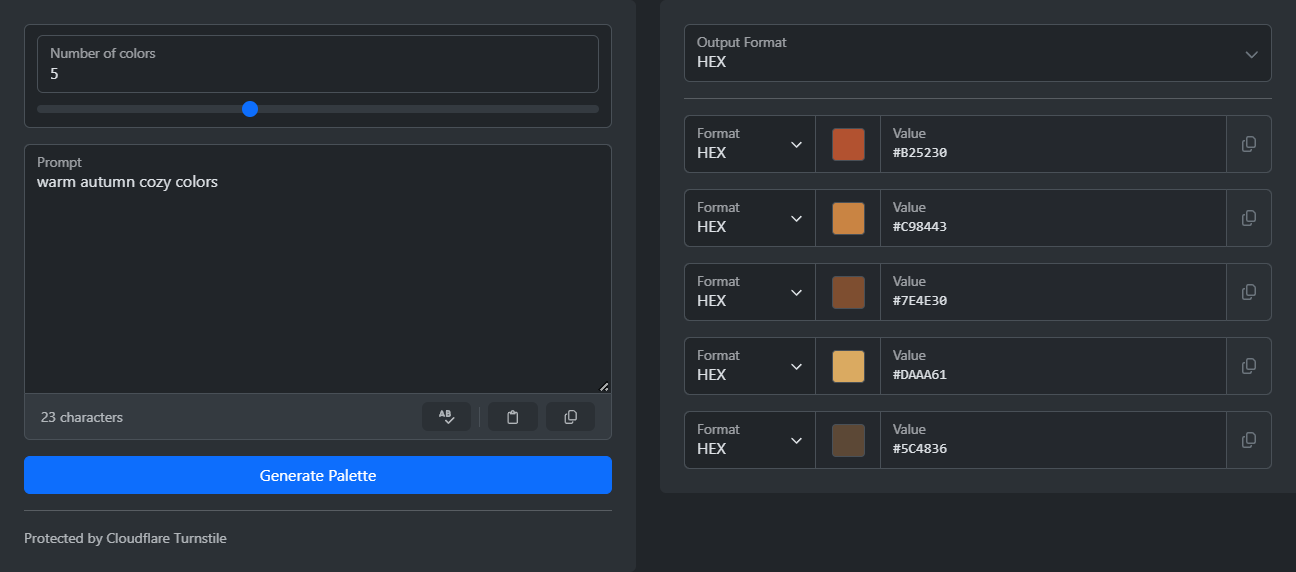
For å lage en fargepalett åpner du AI-fargepalettgeneratoren. Beskriv stemningen du ønsker, og klikk på "Generer palett". Du får et sett med farger som passer sammen. Ved siden av hver farge er det en kopieringsknapp, og du kan velge verdiformat: HEX, RGB, HSL eller HSV.
Det er vanskelig å velge farger for hånd. En farge passer ofte ikke sammen med de andre, og det er ikke alltid tydelig hvordan du kan rette på det. Det er mye enklere å beskrive stemningen med ord. AI gjør beskrivelsen din om til farger.
Slik lager du en palett
- Skriv en kort beskrivelse i feltet Prompt, for eksempel "varme, koselige høstfarger".
- Velg antall farger med glidebryteren. Du kan velge fra 1 til 25.
- Fullfør den korte verifiseringssjekken.
- Klikk på "Generer palett".
- Velg utdataformat, og kopier hver farge med kopieringsknappen.
Slik skriver du en god ledetekst
Ledeteksten er det eneste du skriver inn, så noen ekstra ord kan hjelpe mye. "Vår" kan bety hva som helst. "Myk pastellhage om våren" gir allerede en stemning, et motiv og en idé om hvor sterke fargene skal være.
- Legg til en stemning, ikke bare et motiv: rolig, energisk, luksuriøs, leken.
- Legg til en stil eller periode: art deco, skandinavisk minimalisme, retrostil fra 80-tallet.
- Fortell hvor fargene skal brukes. "Grensesnitt for en velværeapp" og "omslag til en barnebok" gir svært ulike paletter.
- Kombiner to ideer for et mindre vanlig resultat, som "tropisk paradis møter bedriftseleganse".
Hvis resultatet nesten passer, men én farge skiller seg ut, kan du justere ledeteksten litt og generere på nytt. Det går raskere enn å justere én farge for hånd, og den nye paletten holder seg helhetlig.
Hvor mange farger bør du velge?
De fleste prosjekter trenger færre farger enn du tror:
- Tre til et enkelt nettsted: en bakgrunnsfarge, en tekstfarge og én aksentfarge.
- Fem til en app eller merkevare: da får du plass til en ekstra aksentfarge og en nøytral farge.
- Mer enn fem til illustrasjoner, diagrammer eller når du ønsker et stort utvalg.
Slik bruker du paletten
Kopier hver farge i formatet prosjektet ditt bruker. Nettsteder bruker vanligvis HEX eller RGB. HSL er nyttig i designverktøy med skyveknapper for nyanse og lyshet, fordi du kan få en lysere eller mørkere variant ved å endre ett tall. HSV er for verktøyene som bruker det.
Lagre ledeteksten sammen med fargene. Når noen senere ber om "det samme, bare varmere", kan du ta utgangspunkt i den samme ledeteksten.
Klar til å prøve selv?
AI fargepalettgenerator
Generer harmoniske fargepaletter ved hjelp av AI. Beskriv ønsket stemning, tema eller stil, og la kunstig intelligens skape et sammenhengende fargeskjema med navn og beskrivelser for hver farge.