Slik konverterer du farger mellom HEX, RGB, HSL og andre formater
Konverter en farge mellom HEX, RGB, HSL, CMYK og andre formater, se hvilke konverteringer som er nøyaktige, og lær hvilket format du bør bruke hvor.
2 min lesetid
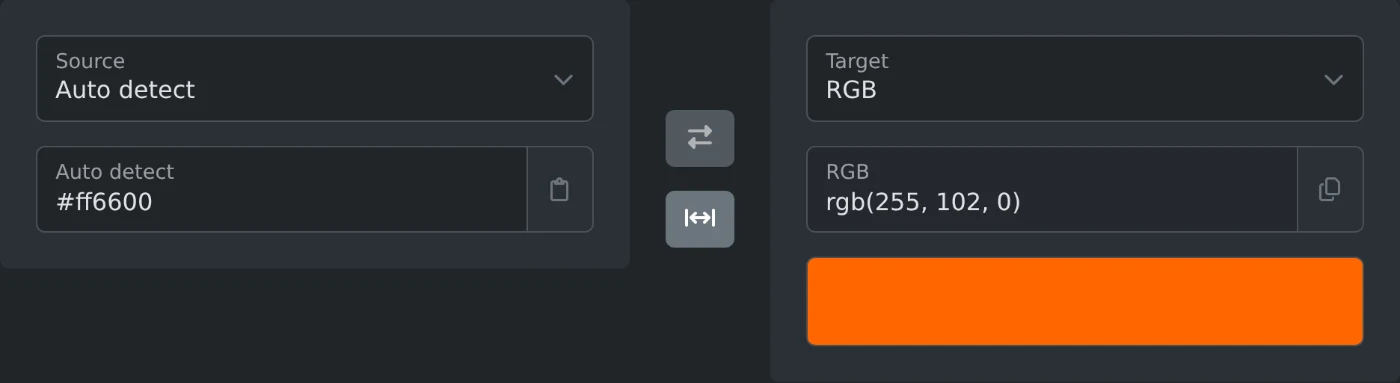
For å konvertere en farge limer du den inn i fargekonvertereren. Velg formatet du trenger under Mål, og kopier resultatet. Verktøyet oppdager selv inndataformatet, så #ff6600, rgb(255, 102, 0), orangered og til og med 255, 102, 0 fungerer. Resultatet vises mens du skriver. En fargeprøve under resultatet viser at verktøyet har tolket riktig farge.
Den samme fargen i fire formater
HEX, RGB, HSL og CMYK er ulike måter å skrive den samme fargen på. Her er én oransje farge i alle fire formatene:
| Format | Verdi | Hva tallene betyr |
|---|---|---|
| HEX | #ff6600 |
Rød, grønn og blå med to heksadesimale sifre hver |
| RGB | rgb(255, 102, 0) |
Rød, grønn og blå fra 0 til 255 |
| HSL | hsl(24, 100%, 50%) |
Fargetone på fargehjulet, metning og lyshet |
| CMYK | cmyk(0%, 60%, 100%, 0%) |
Cyan, magenta, gul og svart trykksverte |
HEX og RGB bruker de samme tre tallene, men skriver dem på ulike måter. Konverteringen mellom dem er nøyaktig. HSL er enklere å justere for hånd: Øk lyshetsverdien, så blir fargen lysere.
Hvorfor CMYK er annerledes
CMYK er for trykk, og de nøyaktige verdiene avhenger av skriveren, papiret og blekket. Konvertereren bruker standardformelen uten en skriverprofil, så et trykkeri kan oppgi litt andre verdier for den samme fargen. Bruk CMYK-resultatet til mockuper, og be trykkeriet om en prøveutskrift før den endelige trykkingen.
Hvilket format du bør bruke
- CSS og HTML: Bruk HEX. Det er kort, og alle nettlesere kan lese det.
- Et fargetema: Bruk HSL. Du får lysere og mørkere nyanser ved å endre ett tall.
- Gjennomsiktighet i kode: Bruk RGB med en alfaverdi eller HEX med åtte sifre.
rgba(37, 99, 235, 0.5)blir til#2563eb80, der de to siste sifrene angir opasiteten. - Trykkemockuper: Bruk CMYK, og husk merknaden ovenfor.
Fargenavn er ikke nøyaktige
Konvertereren støtter 17 formater, inkludert OKLCH, LAB, HSV, CSS-fargenavn og ANSI-koder for terminaler. Et fargenavn som resultat er det nærmeste CSS-fargenavnet, ikke en nøyaktig match. #ff6600 gir orangered, men orangered er egentlig #ff4500. Bruk navn til raske etiketter, og bruk nøyaktige verdier for merkevarefarger.
Lim inn fargen, sjekk fargeprøven og kopier resultatet. Det er hele prosessen.
Klar til å prøve selv?
Fargekonverter
Konverter farger mellom HEX, RGB, HSL, HSV, HWB, CMYK, LAB, LCH, OKLab, OKLCH, XYZ, CSS-fargenavn, ANSI-terminalkoder og mer, med automatisk formatgjenkjenning og forhåndsvisning.